


From Inbox to Ledger: Why Outlook to Xero OCR Automation is the Ultimate SME Power Move

In our introductory blog, we explored how automated document processing is the key to breaking through the growth ceiling. But what does that look like in the day-to-day operations of a Singaporean SME?
The answer lies in connecting your most-used communication tool—Outlook—directly to your financial core—Xero. This link doesn't just move data; it eliminates the hidden "tax" of administrative delays.
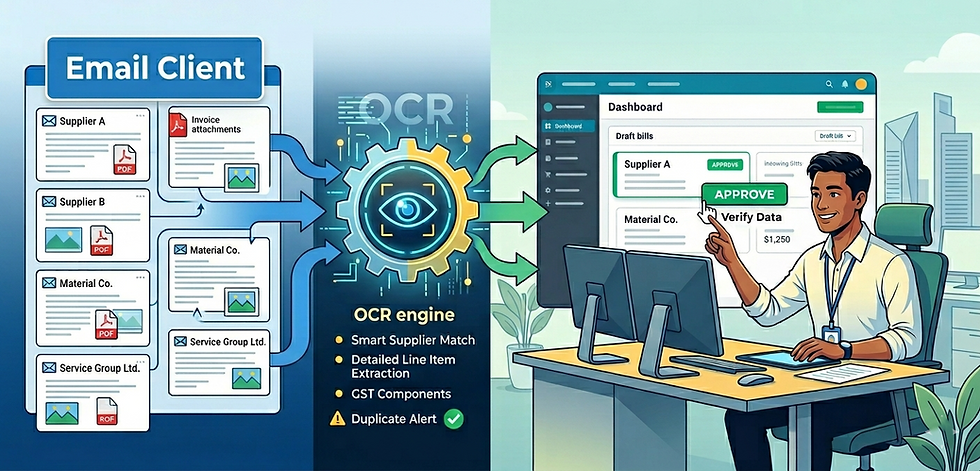
1. The Core Engine: High-Precision OCR
Before we can automate the "flow" of data, we have to "read" it with high accuracy. This is where OCR (Optical Character Recognition) acts as your digital eye. Instead of a staff member squinting at a blurry PDF to find a subtotal, our engine pulls the context of your bills into a digital format:
Smart Supplier Matching: The system cross-references names and bank details against your existing Xero database. This ensures every bill is tagged to the right contact, drastically reducing the "guesswork" and back-and-forth emails for your team.
Detailed Data Extraction: We go beyond the "Total Due." The AI pulls out line items like quantities and unit prices. If you need to see exactly what you spent on "Material A" for a specific project, the data is already drafted. This level of detail raises your efficiency by providing instant cost-tracking without manual typing.
Simplified Tax Support: The engine identifies GST components and multi-currency figures instantly. It helps your team flag the right amounts for your Xero records, making it much easier to keep your data organized for quarterly filings.
The "Second Pair of Eyes": Human fatigue can lead to double payments. The system alerts your team if it spots a duplicate invoice number or a change in supplier bank details, protecting your cash flow from expensive, avoidable mistakes.
2. The Practical Application: Outlook to Xero OCR Automation in Action
Most "manual grinds" start in Outlook. A bill arrives; it sits in the inbox; it gets downloaded, renamed, and eventually uploaded to Xero. We eliminate those middle steps through a direct sync, allowing your email and accounting software to speak the same language:
Step 1: Automated Fetching: Your Outlook identifies incoming invoices and "fetches" the attachment automatically reclaiming the hours usually spent on "Save As" and folder management.
Step 2: Instant Drafting: The data is pushed directly into Xero as a draft bill waiting for verification.
Step 3: One-Click Approval: Your team no longer "creates" data from scratch; they simply review it. A 20-minute data entry task becomes a 20-second "Approve" click, shifting your payroll costs from "clerical work" to "strategic oversight."
The Payoff: Why This Workflow Wins
Feature | The Old Way (Manual) | The New Way (CR Automation) |
Data Flow | Outlook ➔ Desktop ➔ Xero | Outlook ➔ OCR ➔ Xero (Instant) |
Staff Focus | Typing & Copy-Pasting | Strategic Oversight & Approval |
Financial Clarity | Retrospective (Looking Back) | Real-Time Intelligence |
Capacity | Limited by typing speed | Limited only by project volume |
The Verdict: Stop Operating Your Business and Start Leading It
Every minute your team spends moving data from an email to a spreadsheet is a minute they aren't helping you scale. By implementing a grounded Outlook to Xero OCR automation process that bridges the gap between your most-used communication tool to your financial core, you aren't just buying software—you are buying back your time.
Reclaim your time. Build a business that runs on systems, not on your personal stamina. Connect with CR Consultancy today to turn your inbox from a cluttered archive into a high-performance profit engine.


Comments